



.svg)
-
Set up HubSpot right from day one to avoid costly fixes and slow team workflows later.
-
Keep your CRM clean by removing duplicates and importing contacts, companies, and deals in batches.
-
Use role based permissions so people see what they need, and your data stays protected.
-
Build a sales pipeline that matches your real process, then connect email and calendars for full tracking.
-
Install forms, tracking code, and dashboards early, then train the team so HubSpot gets used daily.

Last Updated February 12, 2026 - HubSpot is powerful. But it only works if you set it up properly from the start. Skip the foundations, and you'll spend months fixing problems later.
Key Takeaways
Why Your HubSpot Setup Matters
Getting HubSpot right upfront saves you time and money. A poor setup kills the platform's value fast. You'll avoid tech debt and team headaches by doing it right the first time.
Bad data costs businesses 15-25% of their revenue.[1] That's money you can't afford to lose. Clean setup means your customer data, sales pipeline, and marketing tools work together smoothly.
Core HubSpot Foundations
Focus on these key areas when setting up HubSpot. They form the base every small business needs.
CRM Setup and User Access
Start with basic but critical steps. Fill in your company profile completely. Add your business name, logo, time zone, and currency. These details show up in quotes and emails your customers see.
Next, add your team members. Don't give everyone super-admin access. That's risky. One wrong click can delete important data or mess up settings for everyone.
Instead, give access based on roles.[2] Sales reps need contacts, deals, and tasks. Marketing users need workflows and email tools. Set up clear roles and pick someone to own the CRM long-term.
Clean Contact Data
Your CRM is only as good as your data. Take time to clean and import contacts properly. Remove duplicates and outdated info before importing. Fixing bad data after import takes five times longer than cleaning it first.
Use HubSpot's import tool in batches. Start with contacts, then companies, then deals. Map your spreadsheet columns to the right HubSpot fields.[3] Create custom contact fields thoughtfully. Only add fields you actually need.
Sales Pipeline Setup
Don't use HubSpot's generic pipeline. Map out your actual sales process from first contact to closed deal. Create stages that match each step.
For example: Prospect, Qualified Lead, Demo Scheduled, Proposal, Negotiation, Closed Won/Lost. This helps your team see where every deal stands. Nothing falls through the cracks.
Set up deal properties like value, product type, and close date. You can even automate tasks when deals move between stages. A tailored pipeline means better forecasts and consistent processes.[4]
Email and Calendar Integration

Connect your business email to HubSpot right away. This brings all customer communication into one place. You can send campaigns, track engagement, and use templates from within HubSpot.[5]
When you email a lead from your connected account, it logs on their timeline automatically. Sync your calendar too. This lets you schedule meetings through HubSpot and avoid double-booking.
Set up HubSpot's meeting link tool. Leads can book time on your calendar easily. All meetings appear in HubSpot for complete tracking.[6]
Lead Capture and Tracking
If your website isn't feeding prospects into HubSpot, you're missing out. Create web forms for contact requests, newsletter signups, and demo bookings. HubSpot's form builder works fast without needing a developer.
Install the HubSpot tracking code on your website. This small piece of code tracks visitor behavior and connects form fills to specific contacts. You'll see what pages leads viewed before contacting you.
Forms and tracking set you up for effective lead nurturing from day one.
Dashboard and Reporting
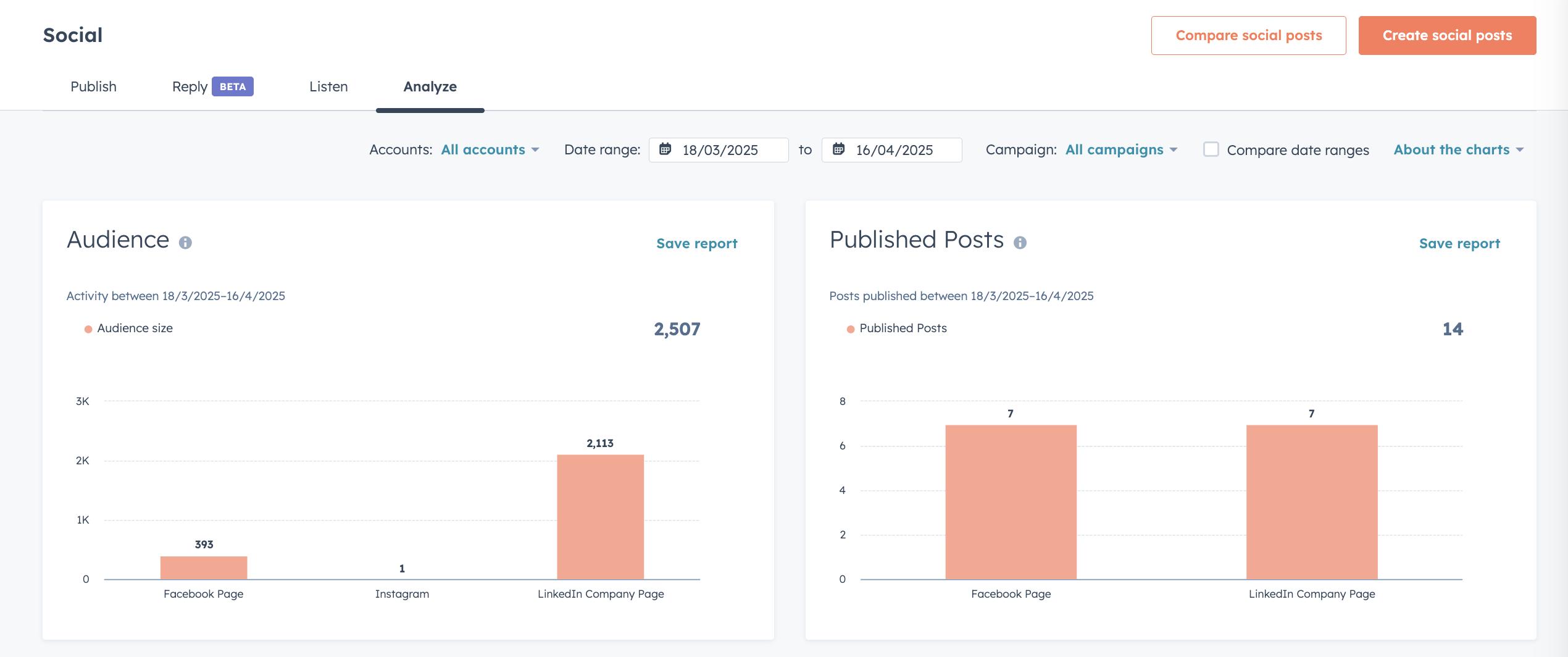
Think about your key metrics early. New leads per month, deals in pipeline, email open rates. Whatever matters to your business.
Create a custom dashboard to monitor these metrics. Add charts, tables, and goal trackers. You get a one-stop view of your sales and marketing health.
Update your dashboards as your business grows. They should always align with your current goals.
Common Setup Mistakes to Avoid

I've seen these mistakes cost businesses time and money:
Starting without a plan leads to messy naming and broken workflows. Define your goals and processes first. What makes a qualified lead? How does marketing hand off to sales? Align your team before configuring anything.
Importing dirty data creates headaches. Deduplicate and clean your data first. Test small batches to make sure everything maps correctly. Bad data in means bad data out.
Giving everyone admin access is dangerous. Use role-based permissions. Give users only what they need. This protects your data and reduces clutter.
Over-customizing confuses your team. Start simple with the minimum fields and stages you need. Expand later if necessary. Document your naming standards so everyone stays consistent.
Skipping team training kills adoption. Train users on basics like logging activities and updating properties. Create an internal usage guide. Everyone needs to work the same way in the system.
The Payoff of Proper Setup
Investing in setup now saves money later. One business spent weeks cleaning up after a rushed import. You won't need to hire someone to fix your database if you do it right upfront.
Proper setup boosts productivity. Your team isn't fighting broken workflows or hunting for missing info. Automations work correctly when the foundation is solid.
Clean data prevents mis-targeted campaigns and lost deals. Clear processes give you better funnel insight and accurate forecasting. You make smarter decisions that drive revenue.
Your Next Steps
HubSpot can transform your business. But only with solid foundations. Focus on clean CRM setup, organized data, tailored pipelines, email integration, lead capture, and useful dashboards.
Avoid common pitfalls by planning ahead and aligning your team. With HubSpot running smoothly, you'll save time, save money, and grow faster.
Ready to set up HubSpot for success? Get expert help to ensure your implementation unlocks the platform's full power from day one.
References
- https://www.techtarget.com/searchdatamanagement/feature/Align-business-and-IT-drivers-through-data-quality-best-practices
- https://knowledge.hubspot.com/user-management/hubspot-user-permissions-guide
- https://knowledge.hubspot.com/import-and-export/understand-the-import-tool
- https://knowledge.hubspot.com/object-settings/set-up-and-customize-pipelines
- https://www.hubspot.com/products/email-integration
- https://knowledge.hubspot.com/meetings-tool/create-and-edit-scheduling-pages
More Insights
Learn More[May 28, 2026, 8:17:00 AM]

Learn More
HubSpot CRM Customisation to Fit Your Industry’s Needs
Learn More
[May 22, 2026, 9:15:00 AM]

Learn More
How to Use HubSpot Workflows to Automate Lead Nurturing
Learn More


Core
Service
Learn More
Intergrations
.svg)
CRM & Marketing Automation
Process Automation Platforms
Business Management Apps
E-commerce Platforms
Messaging Platforms
Cloud-based Accounting
Content Management
For-China Optimisation
Bespoke Systems
Learn More


.svg)