



.svg)

"People don’t buy when they understand you. They buy when they feel understood."
Sales emails used to be a numbers game. Send enough emails, follow up enough times, and eventually someone replies. Today, that approach gets ignored faster than a “just checking in” email sitting in a crowded inbox.
Modern buyers expect relevance. They expect businesses to understand their challenges, timing, and intent before jumping straight into a sales pitch. The problem is that most sales teams do not have the time to manually personalise every email, track every interaction, and optimise every follow-up at scale.
This is where HubSpot and AI can change the way businesses approach sales outreach. HubSpot’s Breeze AI is built into the HubSpot customer platform to help teams create content, summarise information, personalise communication, and automate workflows across HubSpot.
Instead of simply sending more emails, HubSpot AI helps sales teams write smarter emails, personalise outreach faster, analyse engagement, and improve follow-ups without losing the human touch.
If you are still exploring the fundamentals of CRM, our article on CRM for Beginners: A Complete Guide to Building Stronger Customer Relationships explains how CRM acts as the foundation for better customer engagement.
Personalisation at Scale Without Spending Hours Writing Emails
Most sales teams know personalisation matters. The real challenge is doing it consistently.
It is easy to personalise one email. It is much harder to personalise 50 emails a day while managing calls, demos, meetings, proposals, and follow-ups. That is why many teams fall back on generic templates that sound efficient internally but feel cold to the buyer.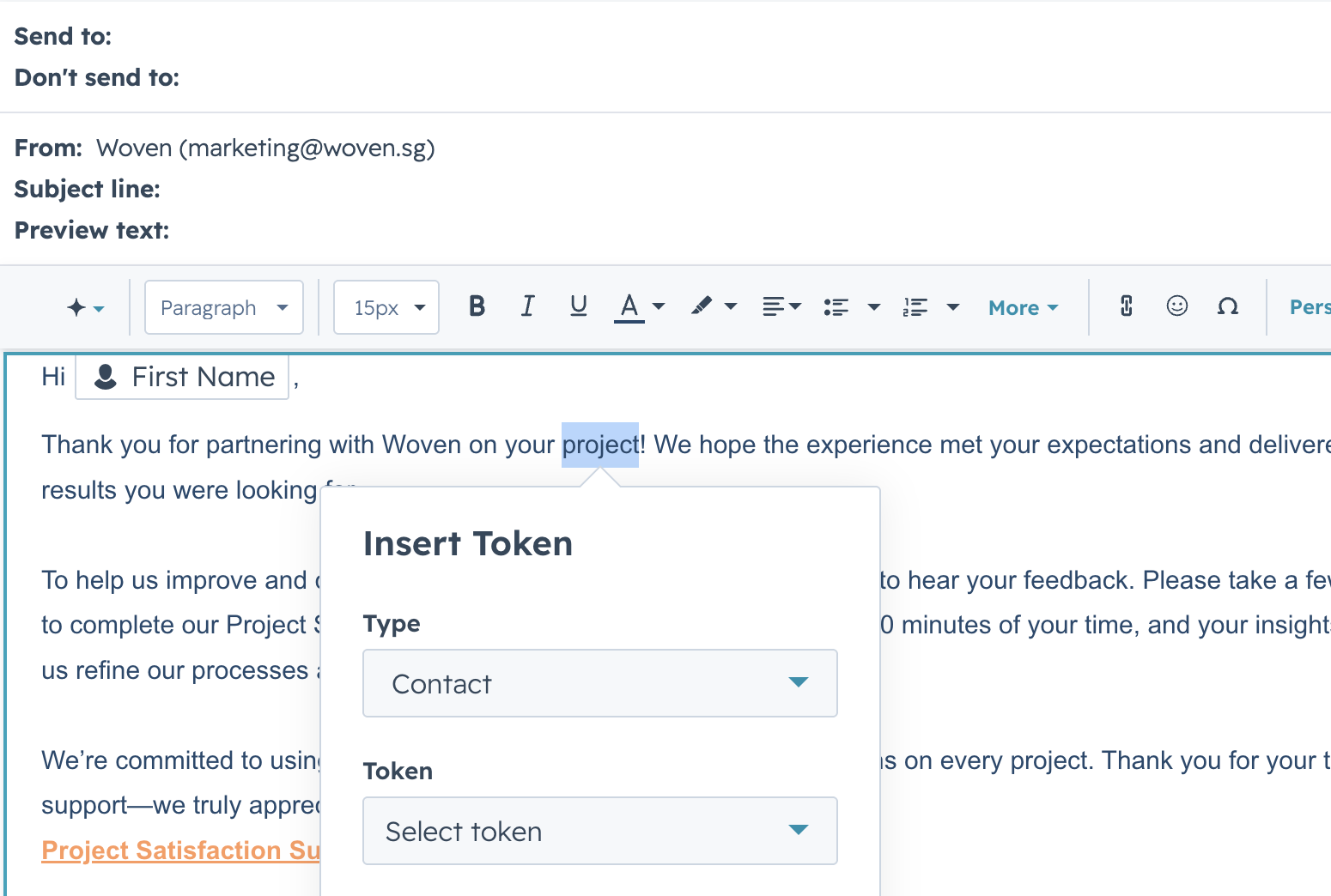
HubSpot helps solve this by combining CRM data with personalisation tools and AI-assisted content creation. Personalisation tokens allow businesses to insert CRM property values into emails, such as a contact’s first name, company name, job title, or other relevant contact and company data stored inside HubSpot.
But personalisation should go beyond “Hi [First Name].”
A stronger sales email can be personalised based on:
- the service the person enquired about
- the form they submitted
- the page they viewed
- their company type
- their lifecycle stage
- their pain point
- their previous conversation with your team
- their industry or business challenge
HubSpot’s Breeze AI can support this by helping sales teams generate sales email templates, refine content, and create personalised outreach using CRM insights.
The goal is not to let AI replace your salesperson. The goal is to help your salesperson get to a better first draft faster, then apply human judgment before sending.
How to Personalise Sales Emails Using HubSpot AI
To personalise sales emails properly in HubSpot, you need to start with the right CRM data. AI can only help if your CRM has useful information to work with.
For example, if someone submits a consultation form, HubSpot should ideally capture more than just their name and email. You may want to capture the service they are interested in, company name, job role, business challenge, current CRM status, and how urgently they need help.
Once this information is in HubSpot, your sales team can use it to create more relevant emails.
A simple personalised sales email could include the contact’s name, their company, the service they enquired about, and the problem they mentioned in the form. Breeze AI can then help turn that information into a clearer email draft, suggest a better subject line, shorten the message, or adjust the tone.
For example, instead of writing:
Hi Sarah, Just checking in to see if you are interested in our services. |
A stronger AI-assisted and CRM-personalised version could be:
Hi Sarah, Thanks for reaching out about improving your sales follow-up process at ABC Company. Many teams we work with face similar challenges when leads come in from multiple channels but follow-ups are still handled manually. Would it be helpful if we shared how HubSpot can help centralise lead tracking and automate follow-ups? |
That small difference matters. The first email is generic. The second email shows context.
This is how HubSpot AI should be used: not to create robotic emails, but to help your team turn CRM data into more relevant communication.
Example of a Sales Email Sequence Using HubSpot AI and Personalisation
Let’s say a prospect submits a form on your website to enquire about HubSpot sales and marketing automation.
Instead of sending one thank-you email and hoping they respond, HubSpot allows you to build a structured follow-up sequence. This sequence can combine automation, CRM data, personalisation tokens, and AI-assisted messaging.
Here is an example of how it could work.
Email 1: Immediate Thank-You Email
This email should be sent shortly after the form submission. The goal is not to hard sell immediately. The goal is to acknowledge the enquiry, set expectations, and show the prospect that your team understands what they asked about.
Example:
Hi Sarah, Thanks for reaching out to Woven about sales and marketing automation for ABC Company. We have received your enquiry and our team will review the details shortly. In the meantime, you may find this article useful: How CRM Fits Into Your Sales Process. It explains how CRM can support lead tracking, follow-ups, and better sales visibility. |
HubSpot personalisation can automatically insert details like the contact’s first name, company name, enquiry type, or assigned consultant. HubSpot AI can help refine the message, suggest subject lines, or create variations for different types of leads.
Email 2: Educational Follow-Up
This email can be sent a few days later if the lead has not replied.
At this stage, the mistake is to keep pushing for a meeting. A better approach is to provide useful content that matches their interest.
For example, if the lead enquired about automation, you can send an article about CRM workflows or sales follow-up efficiency. If the lead enquired about implementation, you can send a resource about Woven’s approach to CRM setup.
Example:
Hi Sarah, Since you were exploring sales and marketing automation, I thought this might be useful. Many businesses start looking at automation when follow-ups become inconsistent, leads are scattered, or teams spend too much time on repeated admin work. This article may help you think through the next step: How to Strategise Your CRM into a Growth Engine. |
This email works because it continues the conversation without sounding desperate. It also gives the lead something useful to read, which helps build trust.
Email 3: Soft Follow-Up Based on Engagement
This is where HubSpot’s tracking becomes useful. If the prospect opens your previous email, clicks a link, or views related pages on your website, your sales team now has a better signal of interest.
The next email can be softer and more specific.
Example:
Hi Sarah, I noticed you were looking into CRM and sales automation resources. A common challenge we see is that teams want automation, but their current lead management process is not clearly structured yet. If helpful, we can walk you through what a simple HubSpot setup could look like for your sales and marketing process. |
This email is not just another follow-up. It is based on behaviour. That makes it more relevant.
HubSpot can track engagement such as email opens and clicks, helping sales teams understand when a lead may be more ready for follow-up. Breeze and HubSpot’s AI capabilities can also support sales teams by helping craft personalised outreach using CRM insights.
Email 4: Re-Engagement Email
If the prospect still does not respond, the final email should not be another “just checking in.”
That phrase is dead weight. It adds no value and tells the reader you have nothing new to say. Instead, use the final email to offer clarity or a useful next step.
Example:
Hi Sarah, I know timing may not be right at the moment. Before I close the loop, I thought I would share one practical point: automation works best when your CRM data, sales process, and follow-up rules are clearly defined first. If your team is still exploring this, Woven can help you review where HubSpot may fit into your current process. |
This is a better closing email because it leaves the door open without sounding needy. It also positions Woven as helpful, not pushy.
Smarter Follow-Ups with HubSpot Sequences and AI
A good sales sequence is not about chasing people endlessly. It is about creating a structured communication path that is helpful, timely, and relevant.
HubSpot Sequences can help sales teams automate follow-up emails and task reminders, while still allowing personalisation at each step. AI can support this process by helping sales reps write email variations, refine messaging, and create follow-up content faster.
A strong sequence should usually include:
-
a clear first response
-
a helpful educational follow-up
-
a behaviour-based follow-up
-
a soft re-engagement message
-
a clear next step
What you should avoid is building a sequence that says the same thing four different ways. That is not nurturing. That is inbox harassment.
The smarter approach is to use each email to move the conversation forward. One email acknowledges the enquiry. One educates. One responds to engagement. One closes the loop. This keeps your outreach structured without making it feel automated.
Using AI Without Losing the Human Touch

This is where many businesses get AI wrong. The goal of AI is not to replace human communication. The goal is to remove repetitive work so sales teams can spend more time on actual relationship-building.
Over-automated sales emails often sound cold, generic, and obviously machine-generated. Buyers notice this quickly. Nobody wants to feel like they are trapped inside a workflow. The best sales teams use AI as an assistant, not a replacement.
AI can help structure emails, suggest messaging angles, summarise customer history, and optimise timing. But empathy, trust-building, negotiation, and understanding customer context still come from people. This balance is critical. Businesses that rely entirely on automation risk damaging relationships. Businesses that combine AI efficiency with authentic communication gain the advantage of both scale and personalisation.
This is also why CRM strategy matters beyond just software implementation. In our article on How to Strategise Your CRM into a Growth Engine, we discuss how businesses can operationalise CRM properly instead of simply treating it as a database.
The Future of Sales Emails Is Smarter, Not Louder
The future of sales outreach is not about sending more emails. It is about sending better ones.
HubSpot’s AI-powered tools help businesses personalise communication faster, automate follow-ups more intelligently, analyse engagement more effectively, and improve email performance over time. But technology alone is not the strategy. The businesses seeing the best results are the ones using CRM and AI to support stronger customer relationships rather than simply increasing automation.
At Woven, we help businesses implement HubSpot in ways that fit their sales processes, workflows, and team operations. From CRM onboarding to workflow optimisation and AI-driven strategies, our focus is helping teams use HubSpot effectively instead of letting it become another under-utilised platform.
If you are looking to improve your sales outreach strategy with HubSpot and AI, Woven can help you build a smarter and more scalable CRM approach.
More Insights
Learn More
HubSpot CRM Customisation to Fit Your Industry’s Needs

How to Use HubSpot Workflows to Automate Lead Nurturing


Core
Service
Learn More
Intergrations
.svg)
CRM & Marketing Automation
Process Automation Platforms
Business Management Apps
E-commerce Platforms
Messaging Platforms
Cloud-based Accounting
Content Management
For-China Optimisation
Bespoke Systems


.svg)